
- Web Accessibility
- September 28, 2026
Shift-Left Accessibility: Catch Issues Before Production
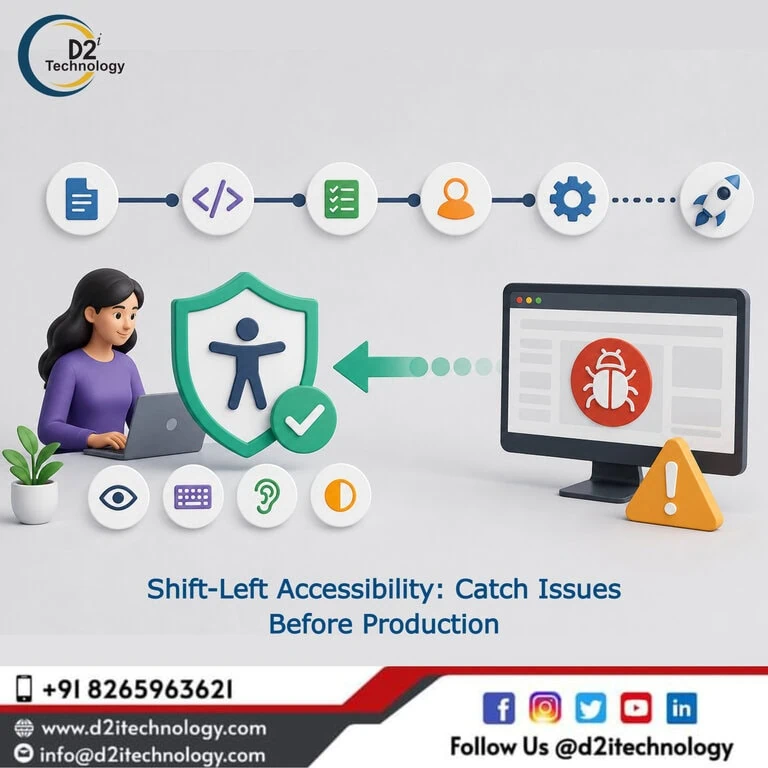
The term “shift-left” comes from the software testing world, where the development timeline is drawn left to right — from requirements through design, coding, and testing, to deployment on the right side. Shifting testing left means moving verification activities earlier in that timeline, toward the left, where catching and fixing issues costs less. Shift-left accessibility applies this same logic specifically to accessibility: rather than evaluating a finished product against WCAG criteria after launch, accessibility checking happens at every stage of development, starting from design and continuing through code review, integration, and release.
The motivation is the same as shift-left testing generally: defects found early are cheaper to fix. The specific arithmetic for accessibility is compelling — a form label missing from a shared component template might cost minutes to fix during component design and hours to fix after launch, especially if that missing label pattern has propagated across dozens of pages before anyone catches it.
The Cost Curve of Late Accessibility Discovery
Before looking at the how, it’s worth being concrete about the why. Accessibility issues found at different stages of the development lifecycle carry dramatically different remediation costs:
During design: An inaccessible color combination identified when the color palette is being defined costs nothing to fix — change the color value before it’s coded anywhere.
During development: An ARIA pattern implemented incorrectly in a component costs the time to fix the component once and retest it.
During QA before release: A broken keyboard interaction found in pre-release testing requires a code fix, a retest cycle, and often a delayed release.
After launch: A missing image alt attribute pattern discovered in a post-launch audit requires identifying all affected pages across production, coordinating a content or code fix, deploying the change, and verifying the fix across every affected instance. If the pattern originated in a shared template, that multiplier can be significant.
During regulatory enforcement: An accessibility violation discovered in an ADA complaint or a SEBI compliance audit requires immediate remediation under regulatory pressure, often with legal costs alongside the technical ones.
The shift-left principle recognizes that the cost of finding and fixing an accessibility issue grows with every stage it advances through the development lifecycle uncaught. Moving accessibility verification left — toward the beginning — is primarily an economic argument, not an idealistic one. Why proactive accessibility consistently produces better organizational outcomes than reactive remediation reflects this cost-of-waiting reality directly.
Where Shift-Left Accessibility Happens in Practice
Shift-left accessibility isn’t a single intervention — it’s a set of practices distributed across the development lifecycle, each suited to the kind of accessibility issues that are catchable at that stage.
In the Design Phase
The design phase is where color choices, typography, interactive component patterns, and information architecture get established. Accessibility issues introduced at this stage are the cheapest to catch and the most expensive to discover later.
What shift-left looks like here:
- Color palette choices evaluated against WCAG contrast ratios during design system creation, not after visual designs are approved
- Component interaction patterns — modal dialogs, dropdown menus, date pickers — designed with keyboard and screen reader behavior defined alongside visual behavior
- Accessibility acceptance criteria written as part of component specifications before implementation begins
- Accessibility review built into design system PR processes, not applied only to final product screens
D2i Technology’s free Color Contrast Analyzer is a practical tool for the color phase of this work. How to use color contrast tools effectively throughout the design workflow covers how to integrate this checking into design decisions rather than post-design review.
In the Development Phase — At Write Time
The earliest point in the code development workflow is when a developer (or an AI agent) is actively writing code. Linting tools that flag accessibility violations inline in the code editor are shift-left accessibility at its most left — catching issues before code is even committed.
What shift-left looks like here:
- ESLint accessibility plugins (eslint-plugin-jsx-a11y for React projects) flagging missing ARIA attributes, incorrect semantic HTML, empty link text, and similar issues as developers write
- IDE extensions that provide real-time accessibility feedback for common patterns
- Agent specifications (in ASDLC contexts) that explicitly include accessibility acceptance criteria, so AI-generated code is required to meet those criteria rather than leaving it to a later review to catch violations
The web accessibility guide written specifically for developers provides the foundational knowledge that makes write-time accessibility checking useful — developers who understand what the tools are flagging and why produce better first-pass accessible code.
In the CI/CD Pipeline — At Merge Time
The CI/CD pipeline is the standard enforcement layer for shift-left testing broadly, and it’s where shift-left accessibility becomes systematic rather than dependent on individual developer attention. Automated accessibility scanning integrated into the pipeline runs on every pull request, fails contributions that introduce accessibility violations, and prevents those violations from merging into the codebase.
What shift-left looks like here:
- Axe-core or equivalent integrated into the test suite, running automated WCAG checks as part of the standard CI run
- Accessibility failures treated with the same weight as failing unit tests — non-optional, blocking merge
- Accessibility scan results surfaced in the same PR review interface developers already work in, rather than in a separate accessibility platform they have to check separately
The best accessibility testing toolkit for development teams in 2026 covers the tooling options for this pipeline integration stage. The top WCAG accessibility compliance checkers available provides a comparative view of the scanning tools worth evaluating.
D2i Technology’s automation testing services include the setup and configuration of accessibility checks in CI/CD pipelines for development teams implementing shift-left accessibility for the first time.
In Code Review — At PR Time
Human code review is where accessibility issues that automated tools miss can be caught before they merge. The automated pipeline catches the structural, machine-detectable violations; a human reviewer evaluates whether the implementation will actually work for screen reader users in practice.
What shift-left looks like here:
- Accessibility-specific review criteria added to the standard code review checklist — e.g., “Does this interactive component work with keyboard-only navigation?” and “Is this error state announced appropriately by screen readers?”
- Accessibility-focused review of shared components and templates, where the multiplier effect of a missed issue is highest
- Code reviewers trained in accessibility fundamentals rather than relying on a single accessibility specialist to review everything
How manual test engineers apply their expertise to code review in AI-assisted development environments covers the human review side of this, explaining where trained human judgment adds accessibility value that automated scanning can’t provide.
What Shift-Left Accessibility Doesn’t Replace
Being precise about the limits of shift-left accessibility matters for setting realistic expectations.
Shift-left doesn’t eliminate the need for periodic comprehensive audits. Automated pipeline scanning catches approximately 30–40% of WCAG violations — those detectable by analyzing code structure and rendered DOM. The remaining violations require manual evaluation: whether alt text meaningfully describes what an image conveys in its instructional context, whether keyboard navigation through complex interactions behaves correctly for real screen reader users, whether ARIA implementation produces appropriate announcements. The difference between manual and automated accessibility evaluation and where each is necessary quantifies this limitation clearly.
Shift-left doesn’t substitute for WCAG expertise. Linting tools and automated scanners flag issues; they don’t teach developers what accessible implementation looks like across the full range of WCAG success criteria. Developer training in accessibility fundamentals is what makes shift-left checking tools actionable rather than just noisy.
Shift-left doesn’t produce compliance documentation. Section 508, ADA, EAA, and SEBI compliance require documentation of how accessibility was addressed — audit reports, VPATs, conformance statements — produced by certified accessibility professionals. What accessibility testing services for US ADA Title II and WCAG 2.2 compliance actually involve covers the compliance documentation dimension that shift-left practices support but don’t replace.
Building a Shift-Left Accessibility Program
Start With the Pipeline, Not the Process
The CI/CD pipeline is the highest-leverage starting point for shift-left accessibility because it’s already the enforcement layer for other quality standards. Adding automated WCAG scanning to an existing pipeline that already runs tests and static analysis requires less organizational change than introducing new process steps.
Configure the pipeline to fail on high-severity accessibility violations and warn on medium-severity ones. Start with violations that are clearly wrong (missing image alt attributes, empty button text, color contrast failures) and expand coverage as the team’s accessibility maturity develops. The future of software quality and what automation testing looks like in practice covers how to think about expanding automation testing scope progressively.
Add Write-Time Checking as Developer Experience Improves
Once the pipeline catches violations before merge, developers get feedback at code review time. Adding write-time linting tools gives them feedback earlier — as they code — which is faster and less disruptive than finding out during a PR review. The sequence matters: pipeline first establishes the floor; linting then moves the same checks earlier in the workflow.
Build Accessibility Into Component Review
The highest-leverage accessibility work happens at the component level. A modal dialog built once with correct focus management, appropriate ARIA roles, and keyboard interaction patterns produces accessible results every time it’s reused. A modal dialog built incorrectly propagates the same accessibility debt to every feature that uses it.
Designated accessibility review for additions to the shared component library — using both automated checking and targeted screen reader testing — is the investment that returns the most in accumulated accessible quality across the product. Why businesses need professional accessibility testing services and what they provide beyond automated scanning covers the expert evaluation layer that component-level accessibility review benefits from.
Schedule Periodic Comprehensive Audits
Shift-left practices reduce the accessibility debt that reaches post-launch audits, but they don’t eliminate the value of periodic formal evaluation. Comprehensive WCAG audits by certified accessibility professionals catch the issues that automated tools miss, produce the compliance documentation that regulatory requirements demand, and identify training or specification gaps that recurring patterns of violations reveal.
D2i Technology’s comprehensive accessibility testing services provide the formal audit layer that completes a shift-left accessibility program, and our accessibility remediation services address the findings those audits surface. The impact that professional manual accessibility audit companies provide explains what this layer adds that automated tooling, however well-integrated, doesn’t cover.
Conclusion
Shift-left accessibility is fundamentally an economic argument wearing quality clothing. The earlier in the development lifecycle an accessibility issue is found and fixed, the cheaper it is — and the more of the codebase that never had to contain it. Design system color palettes, component-level ARIA patterns, CI/CD accessibility gates, and PR review criteria are all points on that left end of the timeline where accessibility investment produces its best returns.
The organizations that build shift-left accessibility into their development workflow systematically — not as a single tool or policy but as practices distributed across design, code writing, pipeline, and review — arrive at post-launch audits with less to fix, better documentation of how they got there, and lower long-term accessibility maintenance costs. D2i Technology’s accessibility testing, remediation, and automation capabilities are designed to support that full spectrum.
Frequently Asked Questions
Start Catching Accessibility Issues Before They Reach Production
D2i Technology helps development teams implement shift-left accessibility — from design system reviews and CI/CD pipeline integration to periodic comprehensive audits that validate what automation can't catch. Let's talk about where your accessibility checks belong in your workflow.