
D2i AccessScan
A powerful, privacy-first WCAG 2.1/2.2 accessibility auditor for Chrome. Instantly detect violations on any page or crawl an entire website - no external API calls, no data transmission, no account required.
Two Powerful Scan Modes
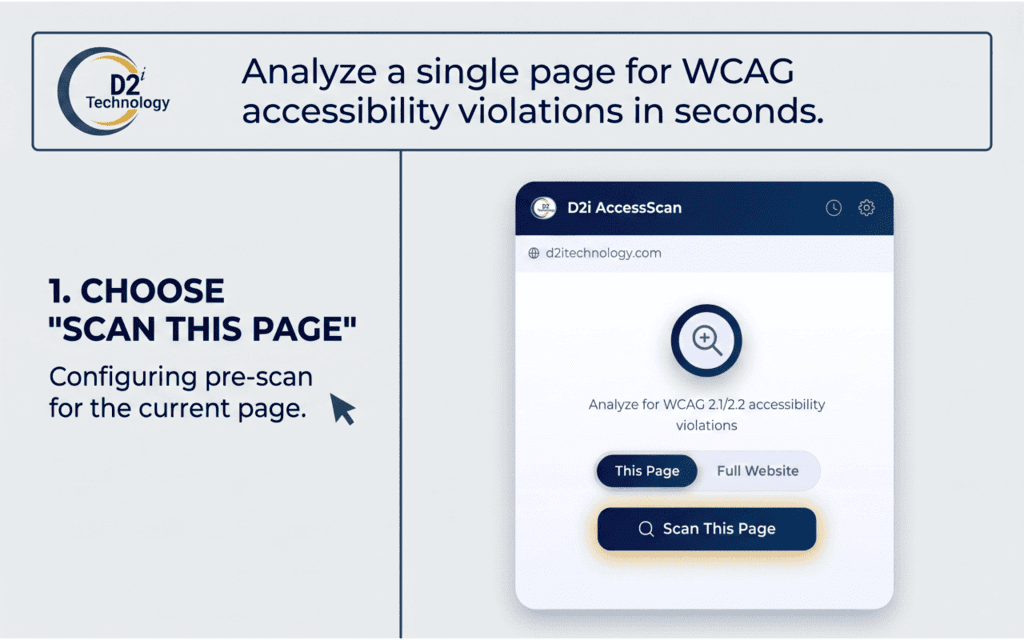
Single Page Scan
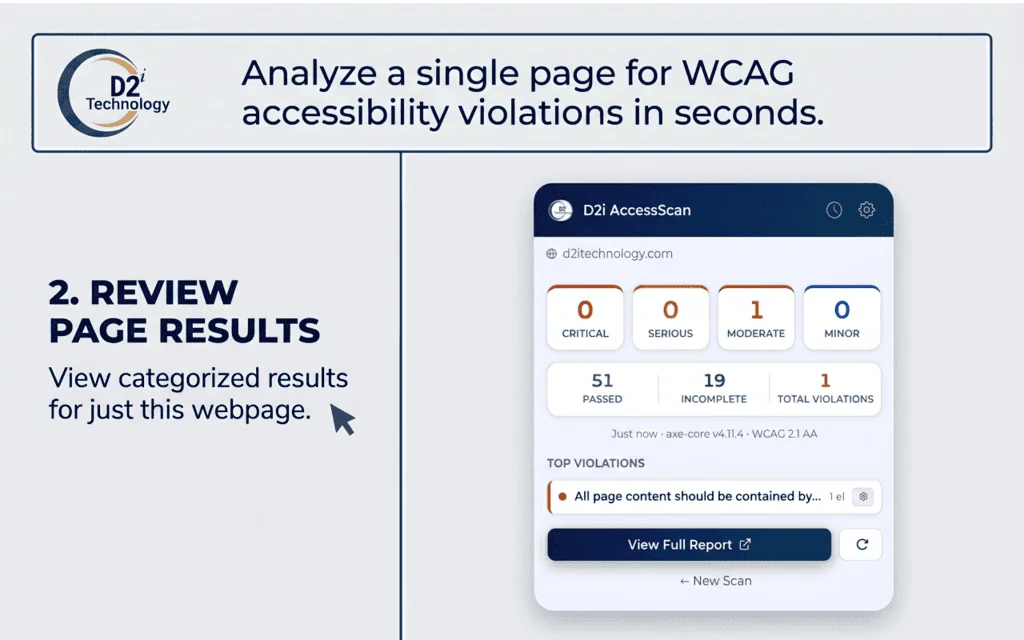
Instantly audit the currently open page using axe-core, the industry-standard accessibility engine. Results appear in seconds with a full severity breakdown - Critical, Serious, Moderate, and Minor - plus code-level remediation guidance.
Full Website Scan
A built-in BFS (breadth-first search) crawler discovers and scans pages across your entire website automatically - with a configurable page limit from 5 pages all the way to unlimited. Each page is opened, audited, and closed - giving you a complete site-wide accessibility picture with zero manual effort.
Screenshots
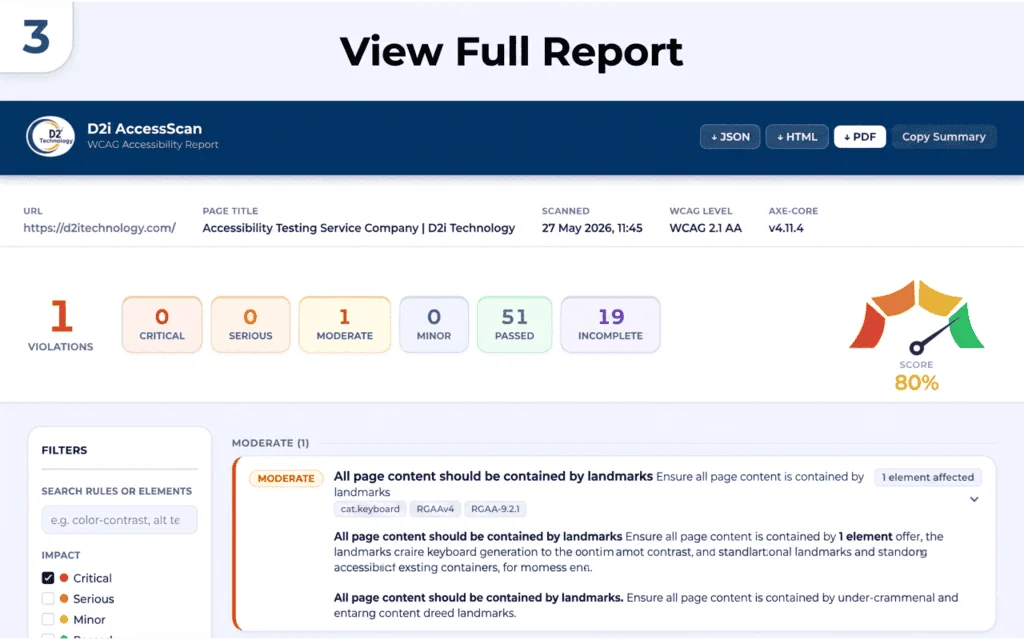
See D2i AccessScan in action - from the popup summary to the full website report.
Key Features
Everything you need for thorough WCAG auditing - built right into your browser.
WCAG 2.1 & 2.2 Coverage
Level A, AA, and AAA checks powered by axe-core - the industry-standard engine.
ADA & Section 508
Built-in compliance checks for ADA Title II/III and U.S. federal Section 508 requirements.
Severity Breakdown
Violations ranked as Critical, Serious, Moderate, and Minor - prioritise your remediation effort.
Code-Level Guidance
See the exact failing element and a clear explanation of how to fix it - no guesswork.
Element Highlighting
Click any violation to visually locate the offending element on the live page - highlighted with a red outline.
Cancel & Partial Results
Stop long website scans at any time. All pages already scanned are saved and displayed as a partial result.
Scan History
Last 10 scans listed with status badges - Pass, Issues Found, In Progress, Terminated - all clickable to reopen reports.
Best Practice Rules
Non-WCAG axe rules that meaningfully improve UX - catch issues before they become violations.
100% Private
Runs entirely in your browser. No data is ever sent to any external server - no telemetry, no monitoring.
Export - Single Page
-
JSON
Raw axe-core results - ideal for CI/CD pipelines and programmatic processing.
-
HTML
Standalone styled report file, shareable without the extension installed.
-
PDF
Print-optimised via the browser dialog - all violations expanded for a complete audit record.
-
Copy Summary
Plain-text summary copied to clipboard - paste directly into tickets or emails.
Export - Full Website
-
CSV
All scanned pages with URL, page title, and violation counts by severity.
-
Sitemap XML
Standard W3C sitemap (
<urlset>) containing all scanned page URLs. -
JSON
Full aggregated scan data across all pages - suitable for tooling and reporting pipelines.
-
PDF
Print the complete website report for offline review or client delivery.
Privacy & Performance
No external requests - axe-core is bundled locally and injected only on demand. There is no background activity and no page monitoring.
No data transmission - audit results are stored in chrome.storage.local on your own device. Nothing leaves your browser.
No telemetry or analytics - zero tracking, no usage data collected, no account required.
On-demand injection - axe-core is injected only when you trigger a scan, keeping runtime footprint minimal on every page you visit.
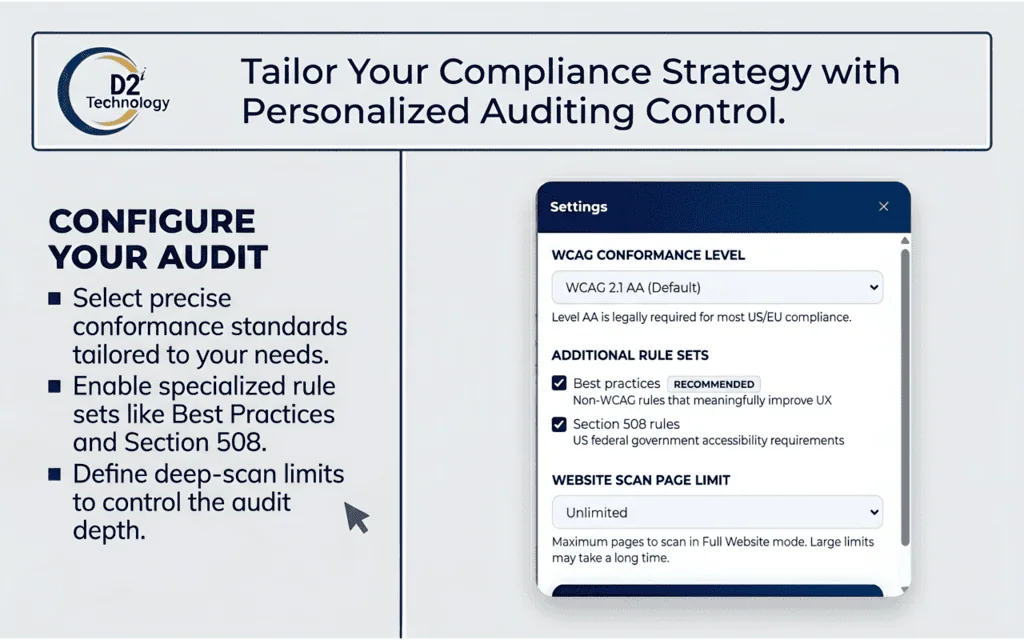
Configurable Settings
WCAG Level
A, AA (default - recommended for ADA and EU EAA), or AAA.
Best Practices
Toggle non-WCAG axe rules on or off (on by default).
Section 508
U.S. federal compliance rules - toggle on when auditing government or federal contractor sites.
Page Limit
5 / 10 / 20 / 50 / 100 / 250 / 500 / 1,000 / Unlimited pages per website scan.
Who Is This For?
-
Web Developers
Check pages during development - catch violations before they reach production.
-
QA Teams
Run accessibility regression checks as part of your standard QA workflow.
-
Accessibility Consultants
Audit client websites quickly and export professional reports in multiple formats.
-
Compliance Officers
Verify ADA, Section 508, and EU EAA conformance across your organisation's web properties.
-
Designers
Review contrast, labels, and focus order on designs before handoff to engineering.
Start Auditing in Seconds
Install D2i AccessScan from the Chrome Web Store - free, no account, no data sent anywhere.
Add to Chrome - Free